Homepage builder
The homepage builder lets you drag and drop sections to create your ideal homepage layout. No code needed.
How to access
Go to Admin Panel → Settings → General, then the Homepage tab. You'll see your current layout on the left and a palette of available sections on the right.
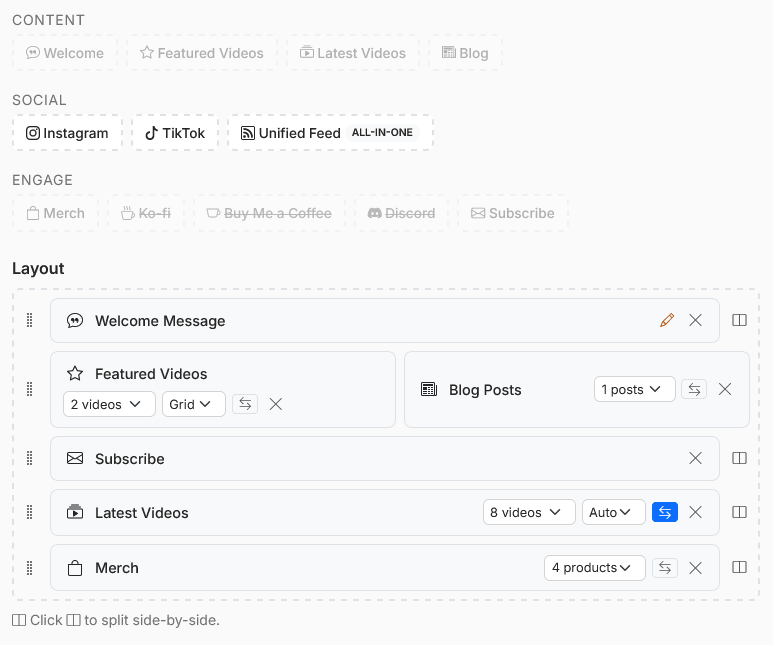
Homepage builder with the section palette and canvas
Available sections
| Section | What it shows |
|---|---|
| Welcome | Your welcome blurb / intro text |
| Featured Videos | Up to 8 hand-picked videos |
| Latest Videos | Your most recent uploads |
| Blog | Your latest blog posts |
| Subscribe | Email subscriber signup form (Starter+) |
| Merch | Products from Fourthwall, Shopify, or Etsy |
| Your Instagram posts | |
| TikTok | Your TikTok videos |
| Feed | Unified chronological feed (all content types) |
| Ko-fi | Ko-fi support widget |
| Buy Me a Coffee | BMC support widget |
| Discord | Discord server embed |
Some sections are only available in the palette once the relevant integration is connected (e.g. Merch requires a connected store, Instagram requires a connected account).
Adding sections
Drag a section from the palette on the right into the canvas on the left. Drop it where you want it to appear.
Reordering
Drag sections up or down in the canvas to reorder them.
Side-by-side layouts
Drag a section next to another section to create a side-by-side (two-column) layout. For example, you might put Ko-fi next to Latest Videos.

Side-by-side layout example with Latest Videos & Ko-fi
Removing sections
Click the ✕ button on a section to remove it from your homepage.
Carousel mode
Any section that displays a grid of items (videos, blog posts, merch, social posts) can be switched to a horizontal scroll carousel. Toggle this in the section's settings.