Set up your About page
Every TubeCMS site includes an About page. You can choose from five templates to tell your story — from a simple text page to a full profile layout with milestones.
Templates
| Template | Available on | Description |
|---|---|---|
| Classic | All plans | Simple markdown text page — write anything you like |
| Profile | All plans | Photo with text wrapping around it |
| Story | Starter+ | Hero image, pull quote, and milestone stats |
| Split | Starter+ | Alternating image and text sections |
| Cards | Starter+ | Profile intro with info cards in a grid |
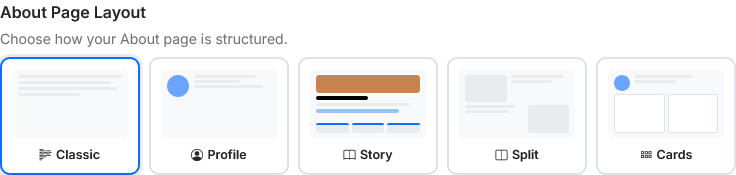
Templates
Setting up
- Go to Admin Panel → Content → Site Content, then the About tab
- Choose a template
- Fill in the fields for your chosen template
- Toggle the About page to visible in the card header
Profile photo
For the Profile and Cards templates, you can upload a profile photo. Drag to reposition the image after uploading to set the focal point.
Milestones (Story template)
The Story template includes up to 3 milestone stats to highlight key moments or achievements — for example "100K Subscribers", "500+ Videos", or "Since 2019". Each milestone has a label and a description.
Visibility
Toggle the About page on or off from the same About tab in Site Content. When turned off, the page returns a 404 and its nav link is hidden from visitors.