How TubeCMS video sync works
TubeCMS uses push notifications from YouTube to sync your videos in near real-time. When you upload a new video to YouTube, your TubeCMS site updates within seconds — no manual action needed.
How it works
- When you connect your YouTube channel, TubeCMS subscribes to your channel's update feed
- YouTube sends a push notification to TubeCMS every time you publish a new video
- TubeCMS fetches the video details (title, description, thumbnail, etc.) and adds it to your site
- Your site visitors see the new video immediately
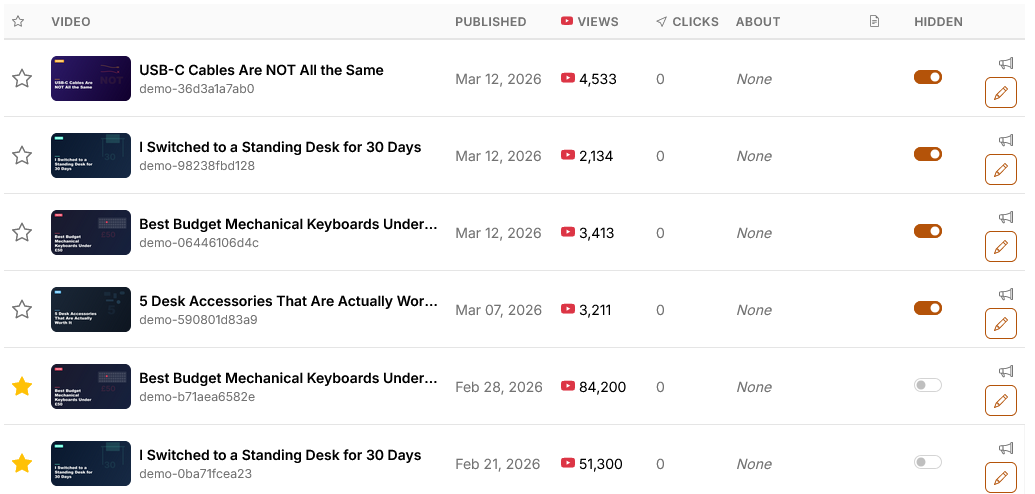
Admin videos page showing synced videos with thumbnails
What triggers a sync
- New video published — appears on your site within seconds
- Video updated — title, description, or thumbnail changes are picked up
- Background refresh — TubeCMS also runs periodic full syncs to catch anything push notifications might miss
Manual sync
On the Starter plan and above, you can trigger a manual sync from Admin Panel → Social → YouTube, then click Refresh Now on the Status tab. This fetches the latest data directly from the YouTube API.
YouTube settings
Manage your YouTube integration from Admin Panel → Social → YouTube:
Cache settings
- Max videos to cache — how many of your videos to store locally (recommended 50–100). Higher numbers mean more of your back catalogue is available on your site.
- Hide new videos by default — when enabled, newly synced videos are hidden from your public site until you manually show them from the Videos page. Subscriber notifications are not sent for hidden videos.
Live stream
- Enable Live Page — adds a
/livepage to your site that auto-detects when you go live on YouTube and embeds your stream with live chat. A pulsing LIVE badge appears in your navigation when you're streaming. - Offline message — the message shown to visitors when you're not currently live.
See Live page for more details.
Status tab
The Status tab shows your current cache stats — videos in cache, last video refresh, last stats refresh, and any sync errors. This is also where the Refresh Now button is located (Starter+ plans).
Video details synced
For each video, TubeCMS stores:
- Title and description
- Thumbnail (multiple resolutions)
- Publish date
- View count (updated periodically)
- Video ID (for embedding)
- Duration
Deleted videos
If you delete or set a video to private on YouTube, TubeCMS detects this during the next sync and automatically removes it from your site. You can also manually hide or remove individual videos from Admin Panel → Content → Videos.